> ## Documentation Index
> Fetch the complete documentation index at: https://smithers-feat-claude-workflow-mirror.mintlify.site/llms.txt
> Use this file to discover all available pages before exploring further.
# How It Works
> The render → execute → persist loop, in one page.
Smithers is a React reconciler whose host elements are tasks instead of DOM nodes. Each render produces a snapshot of the workflow plan; the runtime extracts ready tasks from that plan, executes them, persists their outputs, and re-renders. The plan evolves because each render reads the persisted state.
API reference: [Types](/reference/types) lists every public type, its fields, and links to source and tests.
 That loop is the entire model. Everything below, including branching, loops, approvals, resume, and time travel, is either a JSX construct that affects rendering or a CLI surface over the persisted state.
## The render loop in detail
1. **Render**. The runtime calls your `smithers((ctx) => ...)` builder. The returned JSX tree is reconciled by React; the reconciler emits a graph of host elements (`smithers:workflow`, `smithers:task`, `smithers:sequence`, `smithers:parallel`, `smithers:branch`, `smithers:loop`, `smithers:approval`, etc.).
2. **Extract**. The runtime walks the tree to produce a `GraphSnapshot`, a flat list of `TaskDescriptor`s. Each descriptor captures: node id, ordinal, dependencies, output schema, agent, retries, timeouts.
3. **Schedule**. The scheduler computes the ready set: tasks whose dependencies have completed, whose enclosing sequence has reached them, whose enclosing branch resolved them, and which fit within `maxConcurrency`.
4. **Execute**. Each ready task runs. Three modes: agent (call the LLM, validate output against the Zod schema, retry on failure), compute (run the function), static (write the literal value).
5. **Persist**. Validated outputs are written to per-schema SQLite tables. Internal `_smithers_*` tables capture node state, attempts, frame snapshots, events, and durable approval/signal state.
6. **Re-render**. The next frame begins with `ctx` reading the updated outputs. Tasks that depended on now-completed outputs mount on this frame and become eligible to run.
The frame is the unit of progress. Time travel, observability, hot reload, and resume all key off the frame number.
## The `ctx` API
`ctx` is the only way the workflow body talks to the runtime.
| Method | Returns | Use for |
| ------------------------------------------------------------ | ----------------------------------------------------------- | ------------------------------------------------------------------------------------------ |
| `ctx.input` | `T` | The immutable input passed to `runWorkflow`. |
| `ctx.outputs(table)` / `ctx.outputs.` | `Row[]` | All rows for an output schema key or output target. |
| `ctx.outputMaybe(table, { nodeId, iteration? })` | `Row \| undefined` | Conditional rendering; returns `undefined` until the upstream task completes. |
| `ctx.output(table, { nodeId, iteration? })` | `Row` | Same, but throws if missing. Use inside a Task body where the dep is guaranteed. |
| `ctx.latest(table, nodeId)` | `Row \| undefined` | Highest iteration of a node, used inside `` to read the previous iteration's output. |
| `ctx.latestArray(value, schema)` | `unknown[]` | Parse a JSON string, scalar, or array and keep entries accepted by `schema.safeParse`. |
| `ctx.iterationCount(table, nodeId)` | `number` | Number of completed iterations for a loop node. |
| `ctx.resolveTableName(table)` / `ctx.resolveRow(table, key)` | `string` / `Row \| undefined` | Low-level helpers for custom table references and exact output lookup. |
| `ctx.runId` / `ctx.iteration` / `ctx.iterations` | `string` / `number` / `Record \| undefined` | Identifiers and loop counters for logging and scoped loop reads. |
| `ctx.auth` | `RunAuthContext \| null` | Auth context passed via `RunOptions.auth`. |
Outputs are keyed by `(runId, nodeId, iteration)`. `iteration` is `0` outside loops; inside `` each pass writes a new row at the next iteration index.
The `table` argument means the schema key or output target from `createSmithers`
(`"review"` or `outputs.review`), not a raw SQL table name. The runtime resolves
that key to the actual persisted table.
## Tasks: three modes
```tsx theme={null}
// Agent: call an LLM. Children become the prompt; output validated against schema.
{`Review ${ctx.input.repo}`}
// Compute: children is a function. Runs at execution time.
{() => fs.readdirSync(ctx.input.dir).length}
// Static: children is a plain value. Persisted directly.
{{ region: "us-east-1", retries: 3 }}
```
Agent output validation depends on the agent's structured-output capability. If
the agent declares `supportsNativeStructuredOutput = true` (`AnthropicAgent` and
`OpenAIAgent` by default), Smithers passes the Zod schema to
`agent.generate({ outputSchema })`; those wrappers forward it through the AI
SDK native structured-output channel (`Output.object({ schema })`). If the
agent does not declare that flag (most CLI agents, including `ClaudeCodeAgent`),
Smithers injects JSON instructions into the prompt, extracts JSON from the text,
validates it, and warns about the fallback. Validation failure feeds the error
back into a retry attempt, so agents self-correct on schema drift.
Agents can be a fallback chain: `agent={[primary, fallback]}` tries `primary` first and falls through on failure.
## Control flow
Four primitives. Compose freely.
```tsx theme={null}
// children execute top-to-bottom; default for
// children execute concurrently
} else={}>
```
`` implicitly sequences its children. An explicit `` is only needed when nesting sequential groups inside `` or another control-flow primitive.
Use `.map()` and ternaries when the *number* or *presence* of tasks depends on state. Use `` and `` for fixed task sets whose execution shape depends on state.
`` is the one primitive that re-renders the same body repeatedly: it runs the body, reads the result on the next frame, and re-mounts until `until` holds or `maxIterations` is reached. That cycle is what turns a one-shot agent into one that keeps swinging until the tests are green.
```mermaid theme={null}
flowchart LR
R[Render loop body] --> X[Execute tasks]
X --> Q{until condition met?}
Q -- no --> R
Q -- yes --> D[Exit · return last output]
Q -. maxIterations hit .-> D
style Q fill:#fef,stroke:#a3a
style D fill:#dfe,stroke:#3a3
```
## Data flow is unidirectional
Workflow state lives in SQLite. The render function is a pure function of `ctx` (which reads SQLite). Tasks emit outputs; the runtime persists them; the next render reads them. No mutation, no refs, no `useState` for durable values.
This is the same shape as React rendering UI from props/state, except:
* the "DOM" is the task graph
* "events" are task completions
* "state updates" are output writes that the runtime triggers
That loop is the entire model. Everything below, including branching, loops, approvals, resume, and time travel, is either a JSX construct that affects rendering or a CLI surface over the persisted state.
## The render loop in detail
1. **Render**. The runtime calls your `smithers((ctx) => ...)` builder. The returned JSX tree is reconciled by React; the reconciler emits a graph of host elements (`smithers:workflow`, `smithers:task`, `smithers:sequence`, `smithers:parallel`, `smithers:branch`, `smithers:loop`, `smithers:approval`, etc.).
2. **Extract**. The runtime walks the tree to produce a `GraphSnapshot`, a flat list of `TaskDescriptor`s. Each descriptor captures: node id, ordinal, dependencies, output schema, agent, retries, timeouts.
3. **Schedule**. The scheduler computes the ready set: tasks whose dependencies have completed, whose enclosing sequence has reached them, whose enclosing branch resolved them, and which fit within `maxConcurrency`.
4. **Execute**. Each ready task runs. Three modes: agent (call the LLM, validate output against the Zod schema, retry on failure), compute (run the function), static (write the literal value).
5. **Persist**. Validated outputs are written to per-schema SQLite tables. Internal `_smithers_*` tables capture node state, attempts, frame snapshots, events, and durable approval/signal state.
6. **Re-render**. The next frame begins with `ctx` reading the updated outputs. Tasks that depended on now-completed outputs mount on this frame and become eligible to run.
The frame is the unit of progress. Time travel, observability, hot reload, and resume all key off the frame number.
## The `ctx` API
`ctx` is the only way the workflow body talks to the runtime.
| Method | Returns | Use for |
| ------------------------------------------------------------ | ----------------------------------------------------------- | ------------------------------------------------------------------------------------------ |
| `ctx.input` | `T` | The immutable input passed to `runWorkflow`. |
| `ctx.outputs(table)` / `ctx.outputs.` | `Row[]` | All rows for an output schema key or output target. |
| `ctx.outputMaybe(table, { nodeId, iteration? })` | `Row \| undefined` | Conditional rendering; returns `undefined` until the upstream task completes. |
| `ctx.output(table, { nodeId, iteration? })` | `Row` | Same, but throws if missing. Use inside a Task body where the dep is guaranteed. |
| `ctx.latest(table, nodeId)` | `Row \| undefined` | Highest iteration of a node, used inside `` to read the previous iteration's output. |
| `ctx.latestArray(value, schema)` | `unknown[]` | Parse a JSON string, scalar, or array and keep entries accepted by `schema.safeParse`. |
| `ctx.iterationCount(table, nodeId)` | `number` | Number of completed iterations for a loop node. |
| `ctx.resolveTableName(table)` / `ctx.resolveRow(table, key)` | `string` / `Row \| undefined` | Low-level helpers for custom table references and exact output lookup. |
| `ctx.runId` / `ctx.iteration` / `ctx.iterations` | `string` / `number` / `Record \| undefined` | Identifiers and loop counters for logging and scoped loop reads. |
| `ctx.auth` | `RunAuthContext \| null` | Auth context passed via `RunOptions.auth`. |
Outputs are keyed by `(runId, nodeId, iteration)`. `iteration` is `0` outside loops; inside `` each pass writes a new row at the next iteration index.
The `table` argument means the schema key or output target from `createSmithers`
(`"review"` or `outputs.review`), not a raw SQL table name. The runtime resolves
that key to the actual persisted table.
## Tasks: three modes
```tsx theme={null}
// Agent: call an LLM. Children become the prompt; output validated against schema.
{`Review ${ctx.input.repo}`}
// Compute: children is a function. Runs at execution time.
{() => fs.readdirSync(ctx.input.dir).length}
// Static: children is a plain value. Persisted directly.
{{ region: "us-east-1", retries: 3 }}
```
Agent output validation depends on the agent's structured-output capability. If
the agent declares `supportsNativeStructuredOutput = true` (`AnthropicAgent` and
`OpenAIAgent` by default), Smithers passes the Zod schema to
`agent.generate({ outputSchema })`; those wrappers forward it through the AI
SDK native structured-output channel (`Output.object({ schema })`). If the
agent does not declare that flag (most CLI agents, including `ClaudeCodeAgent`),
Smithers injects JSON instructions into the prompt, extracts JSON from the text,
validates it, and warns about the fallback. Validation failure feeds the error
back into a retry attempt, so agents self-correct on schema drift.
Agents can be a fallback chain: `agent={[primary, fallback]}` tries `primary` first and falls through on failure.
## Control flow
Four primitives. Compose freely.
```tsx theme={null}
// children execute top-to-bottom; default for
// children execute concurrently
} else={}>
```
`` implicitly sequences its children. An explicit `` is only needed when nesting sequential groups inside `` or another control-flow primitive.
Use `.map()` and ternaries when the *number* or *presence* of tasks depends on state. Use `` and `` for fixed task sets whose execution shape depends on state.
`` is the one primitive that re-renders the same body repeatedly: it runs the body, reads the result on the next frame, and re-mounts until `until` holds or `maxIterations` is reached. That cycle is what turns a one-shot agent into one that keeps swinging until the tests are green.
```mermaid theme={null}
flowchart LR
R[Render loop body] --> X[Execute tasks]
X --> Q{until condition met?}
Q -- no --> R
Q -- yes --> D[Exit · return last output]
Q -. maxIterations hit .-> D
style Q fill:#fef,stroke:#a3a
style D fill:#dfe,stroke:#3a3
```
## Data flow is unidirectional
Workflow state lives in SQLite. The render function is a pure function of `ctx` (which reads SQLite). Tasks emit outputs; the runtime persists them; the next render reads them. No mutation, no refs, no `useState` for durable values.
This is the same shape as React rendering UI from props/state, except:
* the "DOM" is the task graph
* "events" are task completions
* "state updates" are output writes that the runtime triggers
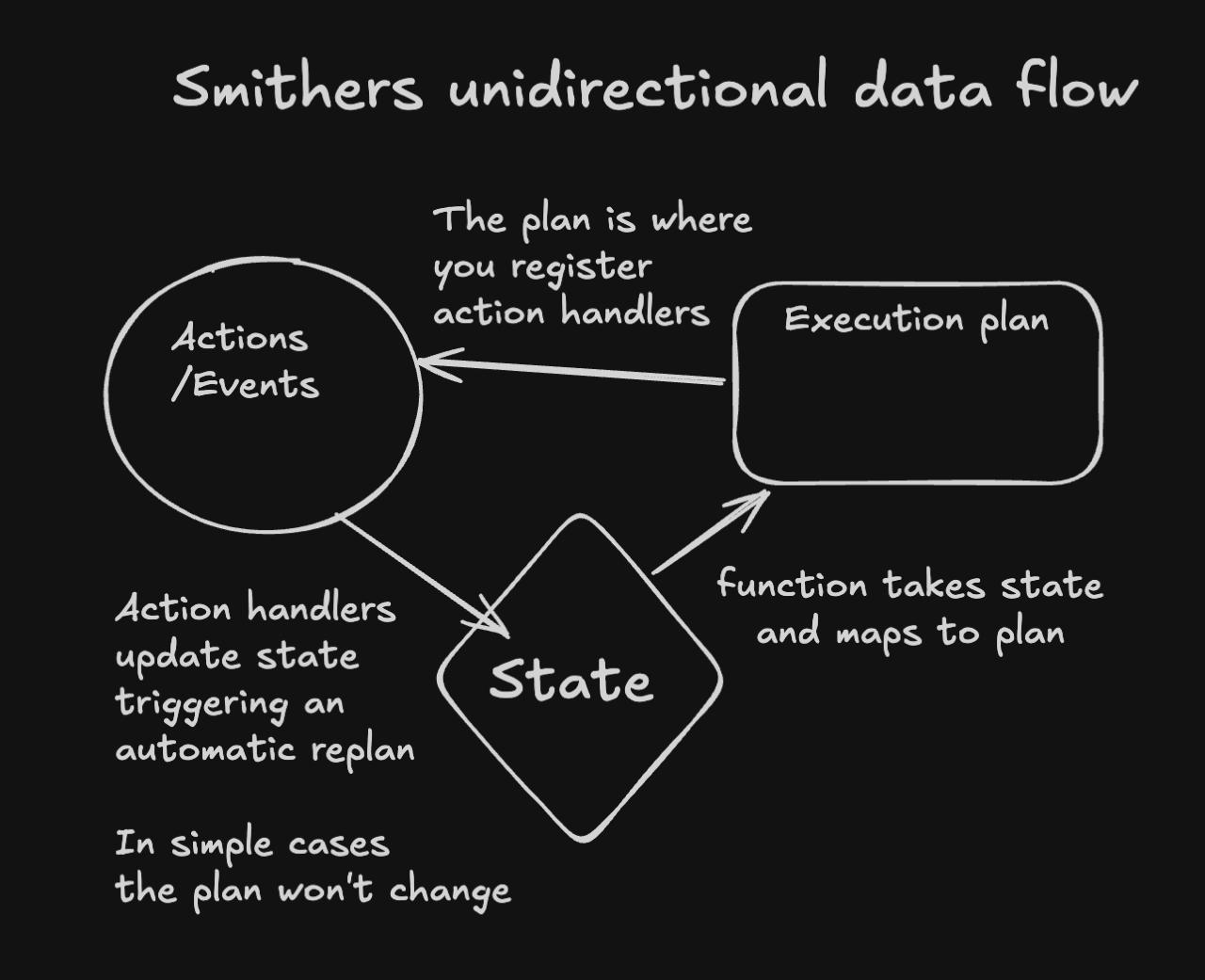 Three consequences:
* The plan is a **derived value**. Re-render after any state change automatically computes the new plan; you never manually mutate the plan.
* **Time travel works** because every frame is a snapshot of (state → plan).
* **Hot reload works** because reloading the workflow code with the same persisted state produces a new plan; the runtime diffs the two and continues from where you left off.
## Reactivity & React patterns
Smithers JSX is real React. Components, props, children, composition, context, hooks, custom hooks: all work.
```tsx theme={null}
function useReviewState(ticketId: string) {
const ctx = useCtx();
const claudeReview = ctx.latest("review", `${ticketId}:review-claude`);
return { claudeReview, allApproved: !!claudeReview?.approved };
}
```
`useState` and `useMemo` are process-local; they reset on every render frame. Use them for ephemeral render-time state. **Anything the workflow must remember across crashes goes through `ctx` and a Task output.**
Conditional mounting matters: a Task that doesn't render is not in the plan. No "skipped" placeholder unless you use `` or `skipIf`. That's what lets `{analysis ? : null}` work as a clean dependency check.
## Approvals & human-in-the-loop
Two surfaces.
`needsApproval` on a Task is a **gate**: pause before execution, no decision data:
```tsx theme={null}
Deploy to production.
```
`` is a **decision node**: it produces a typed `ApprovalDecision` row that downstream rendering can branch on:
```tsx theme={null}
{ctx.outputMaybe(outputs.shipDecision, { nodeId: "ship-decision" })?.approved
?
: }
```
Three denial policies: `"fail"` (abort the run), `"continue"` (proceed without the gated branch), `"skip"` (skip the gated tasks but continue siblings).
```mermaid theme={null}
flowchart TD
A[Approval node] --> Q{your decision}
Q -- approved --> G[Gated branch runs]
Q -- denied --> P{onDeny}
P -- fail --> F[Abort the run]
P -- continue --> C[Proceed without the gated branch]
P -- skip --> S[Skip gated tasks · run siblings]
style F fill:#fde,stroke:#c33
style C fill:#dfe,stroke:#3a3
style S fill:#def,stroke:#36c
```
Operator side is identical for both (you, the agent, run these on the human's behalf; never hand them to the human):
```bash theme={null}
bunx smithers-orchestrator ps --status waiting-approval
bunx smithers-orchestrator approve RUN_ID --node ship-decision --by alice
bunx smithers-orchestrator up workflow.tsx --run-id RUN_ID --resume true
```
`` is for richer interaction: a human submits arbitrary structured JSON. `` and `` are higher-level patterns built from these.
## Durability & resume
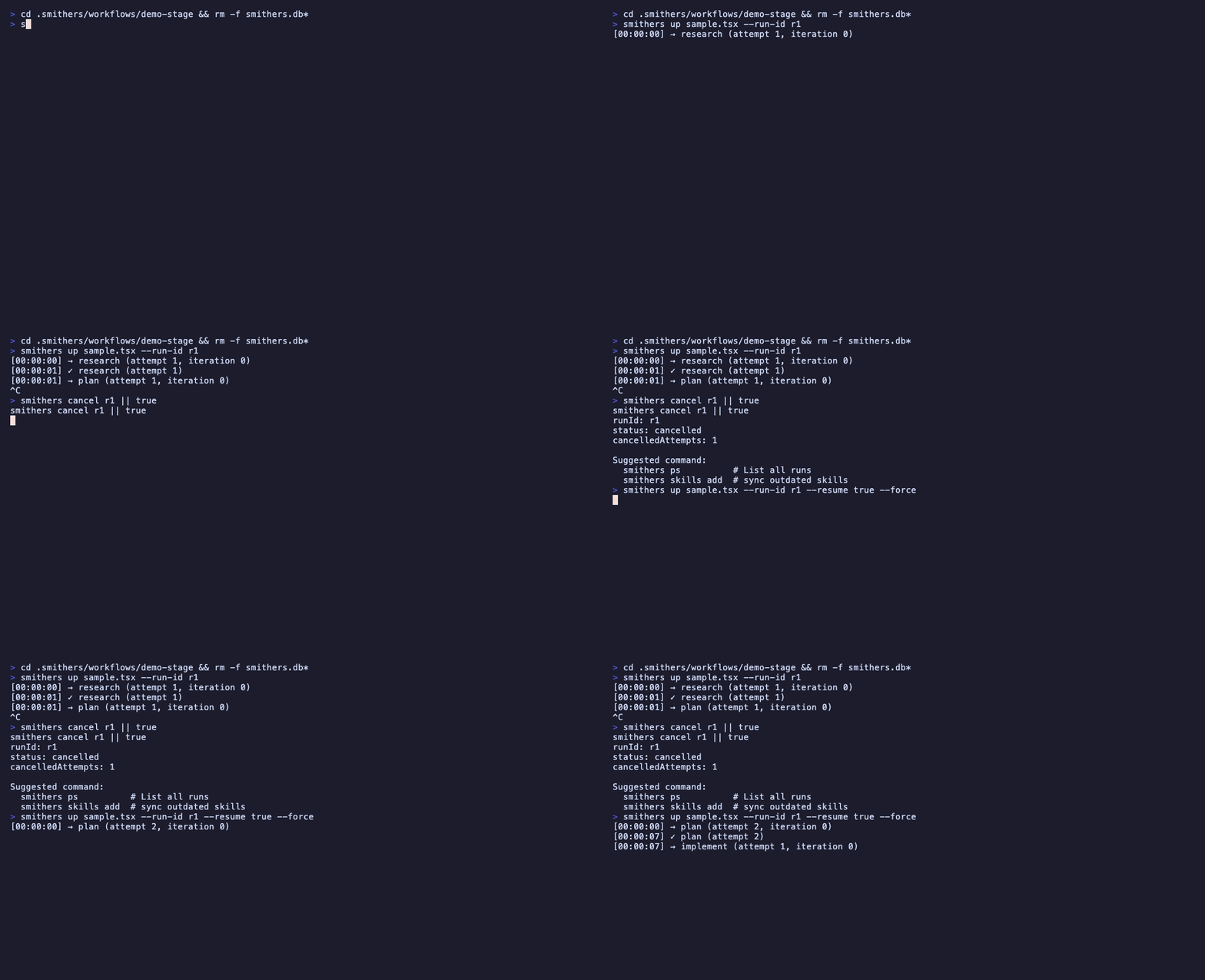
The contract: **a completed task is never re-executed.** Resume loads persisted state, validates the environment (workflow source hash + VCS revision must match the original run), cleans stale in-progress attempts (>15 min without a heartbeat are abandoned), re-renders, and continues.
```bash theme={null}
bunx smithers-orchestrator up workflow.tsx --run-id RUN_ID --resume true
```
Three consequences:
* The plan is a **derived value**. Re-render after any state change automatically computes the new plan; you never manually mutate the plan.
* **Time travel works** because every frame is a snapshot of (state → plan).
* **Hot reload works** because reloading the workflow code with the same persisted state produces a new plan; the runtime diffs the two and continues from where you left off.
## Reactivity & React patterns
Smithers JSX is real React. Components, props, children, composition, context, hooks, custom hooks: all work.
```tsx theme={null}
function useReviewState(ticketId: string) {
const ctx = useCtx();
const claudeReview = ctx.latest("review", `${ticketId}:review-claude`);
return { claudeReview, allApproved: !!claudeReview?.approved };
}
```
`useState` and `useMemo` are process-local; they reset on every render frame. Use them for ephemeral render-time state. **Anything the workflow must remember across crashes goes through `ctx` and a Task output.**
Conditional mounting matters: a Task that doesn't render is not in the plan. No "skipped" placeholder unless you use `` or `skipIf`. That's what lets `{analysis ? : null}` work as a clean dependency check.
## Approvals & human-in-the-loop
Two surfaces.
`needsApproval` on a Task is a **gate**: pause before execution, no decision data:
```tsx theme={null}
Deploy to production.
```
`` is a **decision node**: it produces a typed `ApprovalDecision` row that downstream rendering can branch on:
```tsx theme={null}
{ctx.outputMaybe(outputs.shipDecision, { nodeId: "ship-decision" })?.approved
?
: }
```
Three denial policies: `"fail"` (abort the run), `"continue"` (proceed without the gated branch), `"skip"` (skip the gated tasks but continue siblings).
```mermaid theme={null}
flowchart TD
A[Approval node] --> Q{your decision}
Q -- approved --> G[Gated branch runs]
Q -- denied --> P{onDeny}
P -- fail --> F[Abort the run]
P -- continue --> C[Proceed without the gated branch]
P -- skip --> S[Skip gated tasks · run siblings]
style F fill:#fde,stroke:#c33
style C fill:#dfe,stroke:#3a3
style S fill:#def,stroke:#36c
```
Operator side is identical for both (you, the agent, run these on the human's behalf; never hand them to the human):
```bash theme={null}
bunx smithers-orchestrator ps --status waiting-approval
bunx smithers-orchestrator approve RUN_ID --node ship-decision --by alice
bunx smithers-orchestrator up workflow.tsx --run-id RUN_ID --resume true
```
`` is for richer interaction: a human submits arbitrary structured JSON. `` and `` are higher-level patterns built from these.
## Durability & resume
The contract: **a completed task is never re-executed.** Resume loads persisted state, validates the environment (workflow source hash + VCS revision must match the original run), cleans stale in-progress attempts (>15 min without a heartbeat are abandoned), re-renders, and continues.
```bash theme={null}
bunx smithers-orchestrator up workflow.tsx --run-id RUN_ID --resume true
```
 For resume to work, **task IDs must be stable across renders.** Derive them from data, not from indices or timestamps:
```tsx theme={null}
{tickets.map((t) => )}
// NOT id={`work-${i}`} or id={`work-${Date.now()}`}
```
Same rule as React keys. A changed task ID looks like a new task to the runtime, and an old task whose ID disappeared is dropped from the plan.
The supervisor auto-resumes runs whose owner process died:
```bash theme={null}
bunx smithers-orchestrator supervise --interval 30s --stale-threshold 1m
```
## Session snapshots & fork
Every agent task persists its conversation as a durable session snapshot alongside its output. A later task can start from a **copy** of that context with `fork`:
```tsx theme={null}
Make a plan.
Implement the plan.
```
`fork` is immutable: it copies the source conversation into a fresh, independent session and submits the new prompt. The source is never mutated, so many tasks can fork the same source in parallel, and a forked task can itself be forked. Because the snapshot is read from persisted state on each attempt, fork is resume-safe and the source is never re-executed. Inside a ``, `fork` resolves to the latest completed snapshot for that task id. See [`` fork](/components/task#fork).
## Caching
Per-Task caching with explicit invalidation:
```tsx theme={null}
({ repo: ctx.input.repo, version: "v3" }),
version: "v3",
}}
>
Analyze {ctx.input.repo}
```
Cache key = `cache.by(ctx)` + `cache.version` + the schema signature (SHA-256 of the table structure). A schema change invalidates the cache automatically.
Don't cache side-effect tasks (deploys, emails, mutations). Caching is for pure work that's expensive to recompute.
## Time travel
Every frame commit produces a `GraphSnapshot`.
```bash theme={null}
bunx smithers-orchestrator timeline RUN_ID # frames + forks
bunx smithers-orchestrator diff RUN_ID NODE_ID # node DiffBundle
bunx smithers-orchestrator fork workflow.tsx --run-id RUN_ID --frame 5 --reset-node analyze
bunx smithers-orchestrator replay workflow.tsx --run-id RUN_ID --frame 5 --restore-vcs
```
Replay with `--restore-vcs` checks out the jj revision the snapshot was taken at, so re-execution sees the same source code as the original run.
## Scorers (evals)
Attach evaluators to a Task. They run **after** completion and never block.
```tsx theme={null}
import { schemaAdherenceScorer, latencyScorer } from "smithers-orchestrator/scorers";
Analyze...
```
Five built-ins: `schemaAdherenceScorer`, `latencyScorer`, `relevancyScorer`, `toxicityScorer`, `faithfulnessScorer`. Sampling: `all` / `ratio` / `none`. Custom scorers and LLM-judge scorers with `createScorer` and `llmJudge`.
The public scorer surface also exports `runScorersAsync`, `runScorersBatch`, `aggregateScores`, the `smithersScorers` table, and scorer metrics (`scorersStarted`, `scorersFinished`, `scorersFailed`, `scorerDuration`).
```bash theme={null}
bunx smithers-orchestrator scores RUN_ID
```
## Memory (cross-run state)
Memory is **state that survives across runs** -- namespaced facts and message history. Not the same as task outputs (which are per-run).
Three layers, four namespaces (`workflow`, `agent`, `user`, `global`). Three processors (`TtlGarbageCollector`, `TokenLimiter`, `Summarizer`). See [the full docs bundle](/llms-full.txt) for the full surface.
## Tools & sandboxing
Five built-in tools (`read`, `write`, `edit`, `grep`, `bash`) sandboxed to `rootDir`. Symlinks, network, and timeouts are denied by default; `--allow-network` opens bash to the network.
Least-privilege per task:
```tsx theme={null}
import { AnthropicAgent } from "smithers-orchestrator";
const analyst = new AnthropicAgent({ model, instructions: "..." }); // no tools
const reviewer = new AnthropicAgent({ model, instructions: "...", tools: { read, grep } });
const implementer = new AnthropicAgent({ model, instructions: "...", tools: { read, write, edit, bash } });
```
Use `AnthropicAgent`/`OpenAIAgent` when you want API-billed SDK agents with
native structured output. Use `ClaudeCodeAgent`, `CodexAgent`, and the other CLI
agents when you want the vendor CLI/subscription surface; they can still produce
typed task outputs, but the engine uses the prompt-and-parse fallback unless the
agent documents a native structured-output opt-in.
`defineTool` builds custom tools. Mark side-effecting ones with `sideEffect: true` and use `ctx.idempotencyKey` so retries don't double-fire.
## Common gotchas
* **Stable task IDs.** `id="implement-${i}"` or `id={Math.random()}` breaks resume. Derive from data.
* **`useState` is not durable.** Resets on every render. Persist via `ctx` and a Task.
* **Input is immutable.** Resuming with different `--input` is an error; the input is persisted at first run.
* **Adding a schema field auto-migrates (SQLite).** Adding a field to a typed input or output Zod schema does not require recreating `smithers.db`. On every boot the runtime runs `CREATE TABLE IF NOT EXISTS` and then `ALTER TABLE ... ADD COLUMN` for any column the schema introduced, so new fields are added in place. If you still see `SQLiteError: table input has no column named X`, you are on a build before this boot-time migration landed (or a Postgres-backed DB, which does not auto-add columns yet); upgrade with `bunx smithers-orchestrator --version` or start a fresh run. Renaming or removing a field, or changing a field's type, is not migrated and does need a fresh DB.
* **Code changes block resume.** A workflow source change = a different workflow. Hot reload applies changes within a running frame; resume validates the source hash of the original run. If you stop a run and the source has changed, resume is blocked. Start a new run, don't resume across edits.
* **Cached output is re-validated.** Schema drift after caching is caught (the validator rejects the stale row), so the cache misses safely.
* **Side-effect tasks should not be cached.** Pure work only.
The full list, with the fix for each, is in [Common Footguns](/guides/common-footguns).
## Read next
* [Components](/components/workflow): JSX surface reference.
* [CLI](/cli/overview): every command.
* [Recipes](/recipes): patterns from production workflows.
* [Types](/reference/types): public TypeScript surface.
For resume to work, **task IDs must be stable across renders.** Derive them from data, not from indices or timestamps:
```tsx theme={null}
{tickets.map((t) => )}
// NOT id={`work-${i}`} or id={`work-${Date.now()}`}
```
Same rule as React keys. A changed task ID looks like a new task to the runtime, and an old task whose ID disappeared is dropped from the plan.
The supervisor auto-resumes runs whose owner process died:
```bash theme={null}
bunx smithers-orchestrator supervise --interval 30s --stale-threshold 1m
```
## Session snapshots & fork
Every agent task persists its conversation as a durable session snapshot alongside its output. A later task can start from a **copy** of that context with `fork`:
```tsx theme={null}
Make a plan.
Implement the plan.
```
`fork` is immutable: it copies the source conversation into a fresh, independent session and submits the new prompt. The source is never mutated, so many tasks can fork the same source in parallel, and a forked task can itself be forked. Because the snapshot is read from persisted state on each attempt, fork is resume-safe and the source is never re-executed. Inside a ``, `fork` resolves to the latest completed snapshot for that task id. See [`` fork](/components/task#fork).
## Caching
Per-Task caching with explicit invalidation:
```tsx theme={null}
({ repo: ctx.input.repo, version: "v3" }),
version: "v3",
}}
>
Analyze {ctx.input.repo}
```
Cache key = `cache.by(ctx)` + `cache.version` + the schema signature (SHA-256 of the table structure). A schema change invalidates the cache automatically.
Don't cache side-effect tasks (deploys, emails, mutations). Caching is for pure work that's expensive to recompute.
## Time travel
Every frame commit produces a `GraphSnapshot`.
```bash theme={null}
bunx smithers-orchestrator timeline RUN_ID # frames + forks
bunx smithers-orchestrator diff RUN_ID NODE_ID # node DiffBundle
bunx smithers-orchestrator fork workflow.tsx --run-id RUN_ID --frame 5 --reset-node analyze
bunx smithers-orchestrator replay workflow.tsx --run-id RUN_ID --frame 5 --restore-vcs
```
Replay with `--restore-vcs` checks out the jj revision the snapshot was taken at, so re-execution sees the same source code as the original run.
## Scorers (evals)
Attach evaluators to a Task. They run **after** completion and never block.
```tsx theme={null}
import { schemaAdherenceScorer, latencyScorer } from "smithers-orchestrator/scorers";
Analyze...
```
Five built-ins: `schemaAdherenceScorer`, `latencyScorer`, `relevancyScorer`, `toxicityScorer`, `faithfulnessScorer`. Sampling: `all` / `ratio` / `none`. Custom scorers and LLM-judge scorers with `createScorer` and `llmJudge`.
The public scorer surface also exports `runScorersAsync`, `runScorersBatch`, `aggregateScores`, the `smithersScorers` table, and scorer metrics (`scorersStarted`, `scorersFinished`, `scorersFailed`, `scorerDuration`).
```bash theme={null}
bunx smithers-orchestrator scores RUN_ID
```
## Memory (cross-run state)
Memory is **state that survives across runs** -- namespaced facts and message history. Not the same as task outputs (which are per-run).
Three layers, four namespaces (`workflow`, `agent`, `user`, `global`). Three processors (`TtlGarbageCollector`, `TokenLimiter`, `Summarizer`). See [the full docs bundle](/llms-full.txt) for the full surface.
## Tools & sandboxing
Five built-in tools (`read`, `write`, `edit`, `grep`, `bash`) sandboxed to `rootDir`. Symlinks, network, and timeouts are denied by default; `--allow-network` opens bash to the network.
Least-privilege per task:
```tsx theme={null}
import { AnthropicAgent } from "smithers-orchestrator";
const analyst = new AnthropicAgent({ model, instructions: "..." }); // no tools
const reviewer = new AnthropicAgent({ model, instructions: "...", tools: { read, grep } });
const implementer = new AnthropicAgent({ model, instructions: "...", tools: { read, write, edit, bash } });
```
Use `AnthropicAgent`/`OpenAIAgent` when you want API-billed SDK agents with
native structured output. Use `ClaudeCodeAgent`, `CodexAgent`, and the other CLI
agents when you want the vendor CLI/subscription surface; they can still produce
typed task outputs, but the engine uses the prompt-and-parse fallback unless the
agent documents a native structured-output opt-in.
`defineTool` builds custom tools. Mark side-effecting ones with `sideEffect: true` and use `ctx.idempotencyKey` so retries don't double-fire.
## Common gotchas
* **Stable task IDs.** `id="implement-${i}"` or `id={Math.random()}` breaks resume. Derive from data.
* **`useState` is not durable.** Resets on every render. Persist via `ctx` and a Task.
* **Input is immutable.** Resuming with different `--input` is an error; the input is persisted at first run.
* **Adding a schema field auto-migrates (SQLite).** Adding a field to a typed input or output Zod schema does not require recreating `smithers.db`. On every boot the runtime runs `CREATE TABLE IF NOT EXISTS` and then `ALTER TABLE ... ADD COLUMN` for any column the schema introduced, so new fields are added in place. If you still see `SQLiteError: table input has no column named X`, you are on a build before this boot-time migration landed (or a Postgres-backed DB, which does not auto-add columns yet); upgrade with `bunx smithers-orchestrator --version` or start a fresh run. Renaming or removing a field, or changing a field's type, is not migrated and does need a fresh DB.
* **Code changes block resume.** A workflow source change = a different workflow. Hot reload applies changes within a running frame; resume validates the source hash of the original run. If you stop a run and the source has changed, resume is blocked. Start a new run, don't resume across edits.
* **Cached output is re-validated.** Schema drift after caching is caught (the validator rejects the stale row), so the cache misses safely.
* **Side-effect tasks should not be cached.** Pure work only.
The full list, with the fix for each, is in [Common Footguns](/guides/common-footguns).
## Read next
* [Components](/components/workflow): JSX surface reference.
* [CLI](/cli/overview): every command.
* [Recipes](/recipes): patterns from production workflows.
* [Types](/reference/types): public TypeScript surface.