> ## Documentation Index
> Fetch the complete documentation index at: https://smithers-feat-claude-workflow-mirror.mintlify.site/llms.txt
> Use this file to discover all available pages before exploring further.
# Tour
> Build a code-review workflow in six steps. Every core feature shows up.
A code-review workflow built one capability at a time. Each step is a diff against the previous. Reading time: 15 minutes.
## 1. Install and scaffold
```bash theme={null}
bunx smithers-orchestrator init
bun add smithers-orchestrator ai @ai-sdk/anthropic zod@^4
bun add -d typescript @types/bun
export ANTHROPIC_API_KEY="sk-ant-..."
```
`init` creates `.smithers/` with seeded workflows, prompts, and components. The bun deps add the AI SDK, Anthropic provider, and Zod (schemas).
**Zod v4 is required.** Smithers introspects your output schemas via Zod v4
internals, so pin `zod@^4`. A Zod **v3** schema fails when building an agent
command with the cryptic error `undefined is not an object (evaluating
'schema._zod.def')`.
A minimal `tsconfig.json`:
```json theme={null}
{
"compilerOptions": {
"target": "ESNext",
"module": "ESNext",
"moduleResolution": "bundler",
"jsx": "react-jsx",
"jsxImportSource": "smithers-orchestrator",
"strict": true,
"noEmit": true,
"skipLibCheck": true
}
}
```
`jsxImportSource` is the only line specific to Smithers; it routes JSX through the workflow runtime instead of React DOM.
## 2. One-task workflow
```tsx theme={null}
/** @jsxImportSource smithers-orchestrator */
import { createSmithers, Sequence, Task } from "smithers-orchestrator";
import { z } from "zod";
const { Workflow, smithers, outputs } = createSmithers({
input: z.object({ name: z.string() }), // types ctx.input
greeting: z.object({ message: z.string() }),
});
export default smithers((ctx) => (
{{ message: `Hello, ${ctx.input.name}` }}
));
```
`createSmithers` registers Zod schemas; each becomes a SQLite table. `outputs.greeting` is the typed reference for the `greeting` schema; using it as the `output` prop gives compile-time checks (typo `outputs.greting` is a type error).
The `input` key is special: its schema types `ctx.input` (so `ctx.input.name` is a checked `string`, not `unknown`). Every other key is an output table. Omit `input` and `ctx.input` is untyped, forcing a defensive guard on each field (`ctx.input?.name ?? "world"`). Input fields also arrive as supplied, with no Zod defaults applied, so coalesce any field you do not require. The other schemas (`greeting` here) are the workflow's outputs.
This Task has no `agent`, just a literal value. Run it.
```bash theme={null}
bunx smithers-orchestrator up workflow.tsx --input '{"name":"world"}'
```
Inspect:
```bash theme={null}
bunx smithers-orchestrator ps # find the run id
bunx smithers-orchestrator inspect RUN_ID # structured state
sqlite3 smithers.db "SELECT * FROM greeting;" # the persisted output
```
## 3. Add an agent task
Replace the literal Task with an agent Task whose output is structured.
```tsx theme={null}
/** @jsxImportSource smithers-orchestrator */
import { createSmithers, Sequence, Task, AnthropicAgent } from "smithers-orchestrator";
import { z } from "zod";
const { Workflow, smithers, outputs } = createSmithers({
input: z.object({ repo: z.string() }),
analysis: z.object({
summary: z.string(),
issues: z.array(z.object({
file: z.string(),
line: z.number(),
severity: z.enum(["low", "medium", "high"]),
description: z.string(),
})),
}),
});
const analyst = new AnthropicAgent({
model: "claude-fable-5",
instructions: "You are a senior code reviewer. Return structured JSON.",
});
export default smithers((ctx) => (
{`Review the code in ${ctx.input.repo} and return analysis as JSON.`}
));
```
The runtime injects a JSON-schema description of `outputs.analysis` into the prompt, parses the agent's response, validates against Zod, and persists. Validation failure triggers a retry.
## 4. A second task that depends on the first
Tasks see each other's outputs through `ctx.outputMaybe(...)`. An incomplete upstream returns `undefined`; on the next render frame the upstream output appears and the downstream Task mounts.
```tsx theme={null}
/** @jsxImportSource smithers-orchestrator */
import { createSmithers, Sequence, Task, AnthropicAgent } from "smithers-orchestrator";
import { z } from "zod";
const AnalysisSchema = z.object({
summary: z.string(),
issues: z.array(z.object({
file: z.string(),
line: z.number(),
severity: z.enum(["low", "medium", "high"]),
description: z.string(),
})),
});
const { Workflow, smithers, outputs } = createSmithers({
input: z.object({ repo: z.string() }),
analysis: AnalysisSchema,
fix: z.object({
patch: z.string(),
filesChanged: z.array(z.string()),
}),
});
const analyst = new AnthropicAgent({
model: "claude-fable-5",
instructions: "You are a senior code reviewer. Return structured JSON.",
});
const fixer = new AnthropicAgent({
model: "claude-fable-5",
instructions: "Write minimal, correct fixes as a unified diff.",
});
export default smithers((ctx) => {
const analysis = ctx.outputMaybe(outputs.analysis, { nodeId: "analyze" });
return (
{`Review ${ctx.input.repo}`}
{analysis ? (
{`Fix these issues:\n${analysis.issues.map(i =>
`- [${i.severity}] ${i.file}:${i.line} - ${i.description}`
).join("\n")}`}
) : null}
);
});
```
Render 1: only `analyze` is mounted. Render 2 (after `analyze` finishes): `analysis` is populated, `fix` mounts and runs. That is the entire reactivity story: no hooks, no subscriptions, JSX conditionals over persisted state.
Same shape works for branching, parallel groups, and loops. A `?:` conditional
is the inline form; [``](/components/branch) is the declarative form when
you want explicit `then`/`else` (it takes those as props, not children):
```tsx theme={null}
...
...
...
0}
then={...}
else={...}
/>
...
...
```
## 5. An approval gate
Pause for a human. The runtime persists the pending decision and exits cleanly; the operating agent relays the question to the human, then approves or denies through the CLI; resume picks up from the gate.
```tsx theme={null}
import { Approval } from "smithers-orchestrator";
{analysis ? (
{/* children rendered after approval */}
) : null}
{ctx.outputMaybe(outputs.confirmFix, { nodeId: "confirm-fix" })?.approved ? (
{`Apply patches`}
) : null}
```
Operator side (you, the agent, run these on the human's behalf; never hand them to the human):
```bash theme={null}
bunx smithers-orchestrator ps --status waiting-approval # find paused runs
bunx smithers-orchestrator inspect RUN_ID # see the request
bunx smithers-orchestrator approve RUN_ID --node confirm-fix --by alice
bunx smithers-orchestrator up workflow.tsx --run-id RUN_ID --resume true
```
`onDeny` controls behavior on rejection: `"fail"` aborts the run, `"continue"` proceeds without the approved branch, `"skip"` skips the gated tasks.
## 6. Crash, then resume
Every completed task's output sits in SQLite. A crash, kill, or restart loses no work; the next run with `--resume true` skips finished tasks.
```bash theme={null}
bunx smithers-orchestrator up workflow.tsx --input '{"repo":"."}' --run-id review-1
# ...analyze finishes, fix is mid-flight, you Ctrl+C
bunx smithers-orchestrator up workflow.tsx --run-id review-1 --resume true
# analyze is skipped (already in DB), fix re-runs from scratch (was incomplete)
```
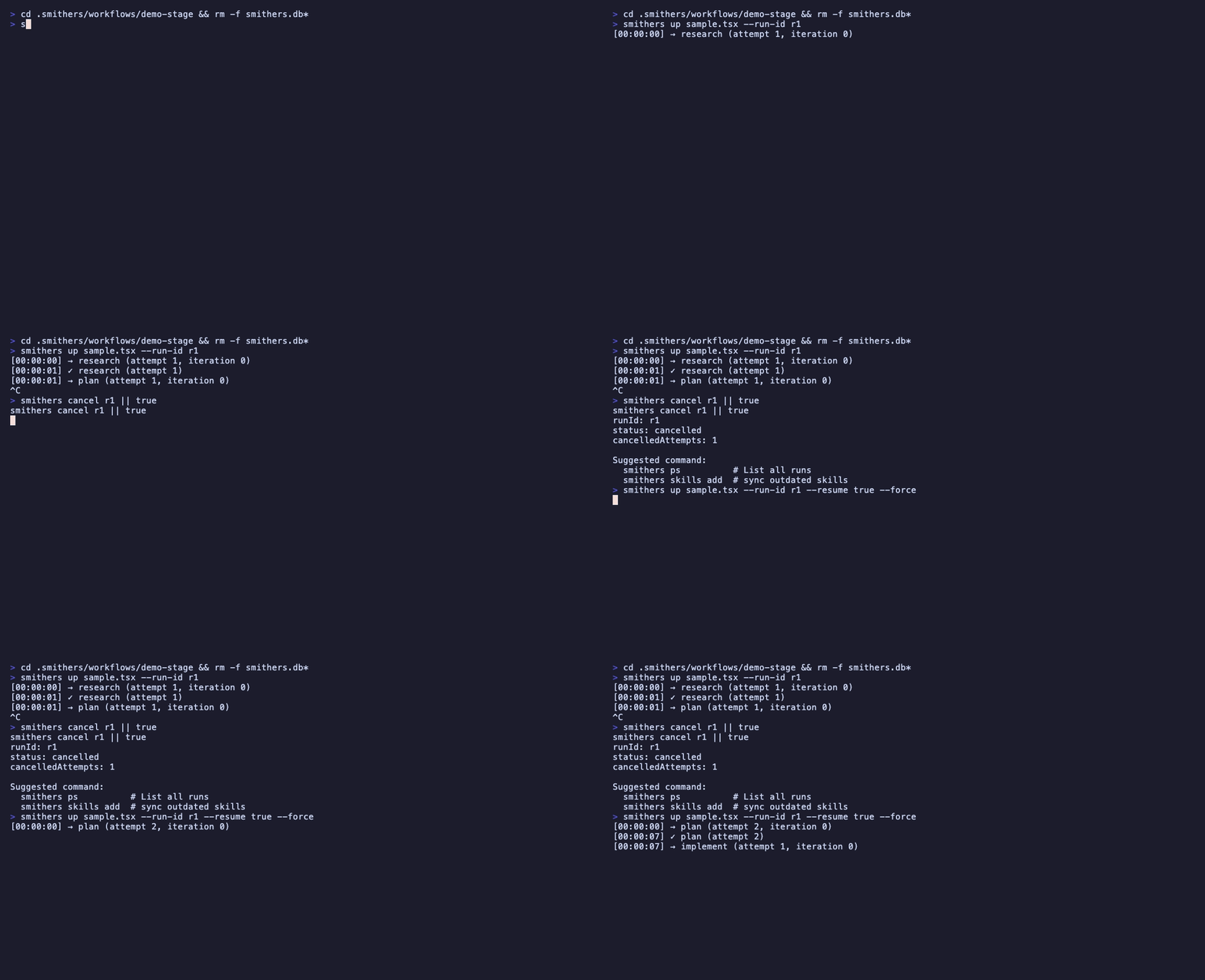 In-flight attempts are marked stale and re-tried; finished tasks are not. Resume is deterministic: same input + same code = same task IDs.
For unattended recovery, run the supervisor:
```bash theme={null}
bunx smithers-orchestrator supervise --interval 30s --stale-threshold 1m
```
It auto-resumes runs whose owner process died.
## What you skipped (and where to find it)
* **Time travel** (replay a frame, fork a run, diff two runs): `bunx smithers-orchestrator replay|fork|diff|timeline`. See [How It Works → Time travel](/how-it-works#time-travel).
* **Scorers** (attach evaluators to Tasks): see [Recipes → Scoring tasks](/recipes#scoring-tasks).
* **Memory** (cross-run facts and message history): see [How It Works → Memory](/how-it-works#memory-cross-run-state).
* **RAG**, **voice**, **OpenAPI tools**: opt-in fragments. See the index in [llms.txt](/llms.txt).
* **Tool sandbox** (read/grep/bash with path containment): see [Recipes → Tools](/recipes#coherent-task-with-tools).
## Read next
* [How It Works](/how-it-works): the render → execute → persist loop.
* [Components](/components/workflow): JSX surface reference.
* [CLI](/cli/overview): every command in one table.
* [Recipes](/recipes): patterns from production workflows.
In-flight attempts are marked stale and re-tried; finished tasks are not. Resume is deterministic: same input + same code = same task IDs.
For unattended recovery, run the supervisor:
```bash theme={null}
bunx smithers-orchestrator supervise --interval 30s --stale-threshold 1m
```
It auto-resumes runs whose owner process died.
## What you skipped (and where to find it)
* **Time travel** (replay a frame, fork a run, diff two runs): `bunx smithers-orchestrator replay|fork|diff|timeline`. See [How It Works → Time travel](/how-it-works#time-travel).
* **Scorers** (attach evaluators to Tasks): see [Recipes → Scoring tasks](/recipes#scoring-tasks).
* **Memory** (cross-run facts and message history): see [How It Works → Memory](/how-it-works#memory-cross-run-state).
* **RAG**, **voice**, **OpenAPI tools**: opt-in fragments. See the index in [llms.txt](/llms.txt).
* **Tool sandbox** (read/grep/bash with path containment): see [Recipes → Tools](/recipes#coherent-task-with-tools).
## Read next
* [How It Works](/how-it-works): the render → execute → persist loop.
* [Components](/components/workflow): JSX surface reference.
* [CLI](/cli/overview): every command in one table.
* [Recipes](/recipes): patterns from production workflows.